

- What is payment gateway architecture?
- How a transaction flows through the gateway
- The core layers of payment gateway architecture
- Payment gateway components
- How the gateway connects merchants, providers and payment methods
- Payment gateway security architecture
- Designing a gateway for scale and resilience
- Common payment gateway architecture mistakes
- Build, buy source code or use white-label?
- How Akurateco supports PSPs and acquiring banks
- Key takeaways
- Conclusion
Payment gateway architecture is how gateway software is built from components grouped into layers and how transaction data moves through them between the merchant and the payment providers. The layers matter more as a PSP adds merchants, because each layer must absorb new accounts, providers, and payment methods without changing the layers around it.
Each merchant that a PSP or acquiring bank adds brings its own currencies, payment methods, fees, and support cases to configure and track. If the architecture isn’t built for this right from the start, every new merchant means custom fixes and more manual work for the operations team.
Below, we follow a transaction through the gateway, then break the gateway into its seven core layers and its components. Later sections cover how the gateway connects to providers, how it is secured, and how to design it for scale. The last part lists the most common architecture mistakes. If you need the basics first, start with a plain-language explanation of how a payment gateway works.
What is payment gateway architecture?
Payment gateway architecture describes the components a gateway is built from and the layers they sit in. In practice, the architecture of a payment gateway determines which component accepts a payment request, which one routes it, which one sends it to the provider, and where the result is stored.
At a basic level, a payment gateway moves transaction data between the merchant and the financial institutions involved in the payment. For PSPs and acquiring banks, a complete payment gateway software setup usually includes merchant onboarding, merchant management, payment pages, APIs, provider connectors, transaction processing, routing logic, fraud controls, tokenization, reporting, reconciliation, billing, and back-office tools.
The broader the PSP business model, the more important these layers become. A merchant that only needs to accept payments on one website may use a standard PSP account. A company that wants to sell payment services to many merchants needs a payment gateway built for merchant operations.
How a transaction flows through the gateway
Payment gateway software works by receiving payment data from a merchant or payment page, validating the request, sending it to the right provider or acquirer, receiving the response, and returning the transaction result to the merchant. Behind that flow, the system records statuses, applies risk checks, updates reports, and prepares data for settlement and reconciliation.
Here is what a typical online card transaction looks like:
- The customer starts checkout and enters payment details or chooses a saved payment method.
- The merchant sends the payment request to the gateway through an API, plugin, hosted payment page, or payment link.
- The gateway validates the request, checks merchant settings, and applies required security and risk controls.
- The transaction is sent to the relevant acquirer, processor, or provider connector.
- The request moves through the card network to the issuing bank for authorization.
- The issuer returns an approved, declined, or error response.
- The gateway sends the result back to the merchant and triggers the relevant webhook or callback.
- The transaction record becomes available in reports, logs, and back-office tools.
After authorization, follow-up actions such as capture, refund, void, chargeback handling, settlement reporting, and reconciliation may take place depending on the payment model.
The core layers of payment gateway architecture
A strong payment gateway architecture keeps the main parts of the system organized. The table below groups them into seven layers.
| Architecture layer | What it does | Why it matters for PSPs |
|---|---|---|
| Merchant-facing layer | Includes the payment page, API, plugins, payment links, and merchant portal | Gives merchants the tools to accept payments, view activity, and manage basic payment operations |
| Gateway core | Processes payment requests, transaction statuses, callbacks, captures, refunds, and voids | Controls the payment lifecycle from request to response and post-payment actions |
| Routing and provider layer | Connects acquirers, PSPs, processors, fraud tools, and alternative payment methods | Helps the payment business expand its provider network and support more payment options |
| Merchant management layer | Handles merchant profiles, settings, limits, fees, currencies, users, and permissions | Allows PSPs to manage many merchants from one system instead of relying on manual setup |
| Risk, security, and compliance layer | Supports fraud rules, transaction limits, tokenization, secure data handling, audit logs, and monitoring | Helps reduce risk, protect payment data, and support compliance-related processes |
| Back-office layer | Gives internal teams tools for configuration, support, dispute handling, transaction checks, and issue management | Helps PSP teams control daily operations without depending on developers for every change |
| Reporting and reconciliation layer | Provides transaction data, fee records, settlement information, exports, and provider performance reports | Helps PSPs support merchants, track financial activity, and match transactions with settlement data |
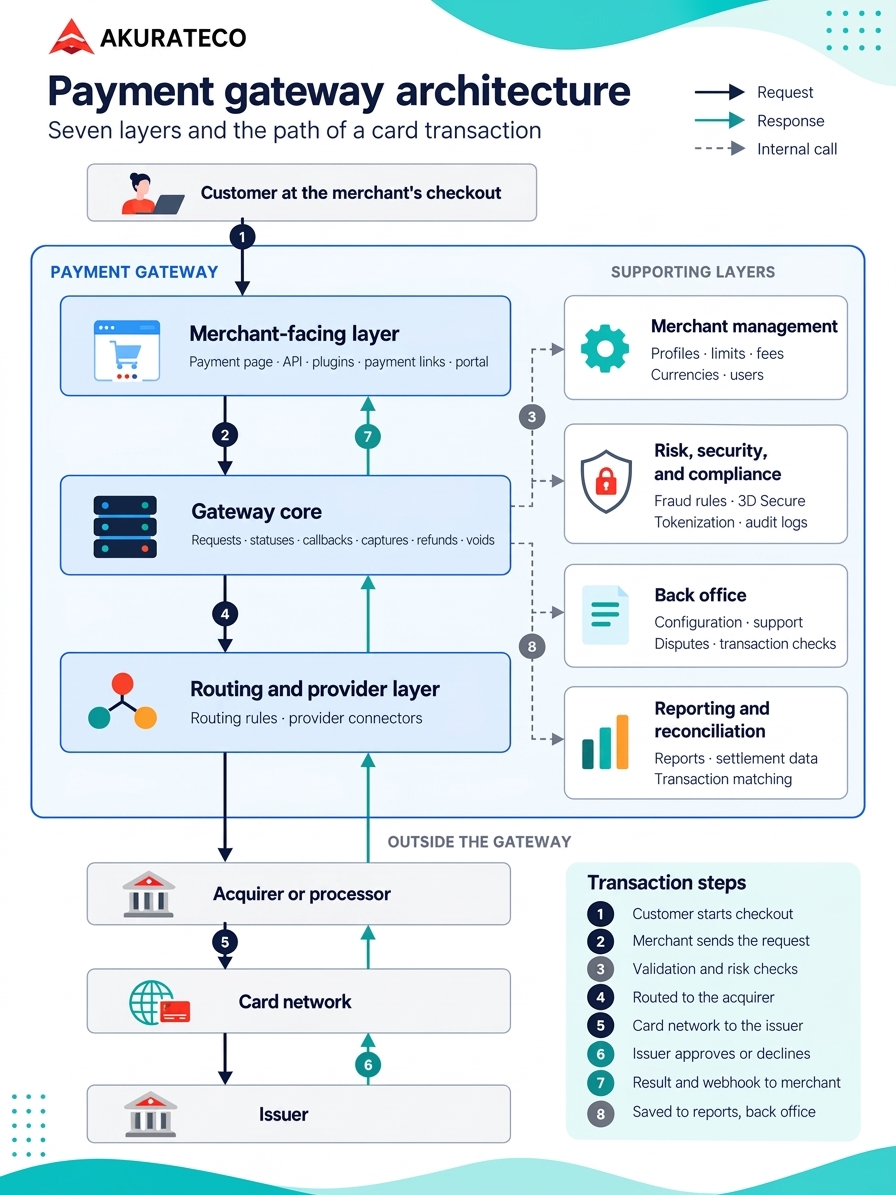
In the wider payment system architecture, the gateway is often shown as a single layer between checkout and the acquirer. A gateway built for PSPs covers more. It also handles routing, risk checks, and reporting, and adds merchant management and back-office layers for running many merchants.
When PSPs are creating a gateway on solid architecture, the layers should work together but remain manageable on their own. This lets them add new connectors, support more merchants, improve risk control, and scale without rebuilding the core system after every product change.
Scalability also needs to be planned into the gateway from the beginning. A setup that works for one merchant can become difficult to manage when hundreds of merchants require different currencies, payment methods, limits, fees, risk rules, reports, and settlement models. To understand how white-label gateways work at scale, PSPs should consider how merchant management, provider connections, transaction activity, reporting, and back-office workflows are handled within one branded platform.
Payment gateway components
Payment gateway software must include more than just a payment API. A proper PSP setup should have facilities for merchant management, transaction processing, integrations with providers, secure handling of data, reporting, reconciliation, billing, and back-office tools that allow the payment teams to run the business on a day-to-day basis.
The essential components are easiest to understand by looking at what each one helps the PSP manage.
| Component | What it should support | Why it matters for PSPs |
|---|---|---|
| Merchant onboarding | Merchant applications, document collection, approval flows, status changes | Helps PSPs review, approve, and activate merchants faster |
| Merchant management system | Merchant profiles, limits, currencies, payment methods, users, roles, and settings | Gives operations teams central control over many merchants |
| Hosted payment page | Branding, fields, payment methods, localization, redirects, and callbacks | Allows merchants to accept payments without building a complex checkout flow |
| API layer | Payments, refunds, captures, voids, recurring payments, webhooks, and callbacks | Lets merchants connect directly to the gateway and automate payment flows |
| Provider connectors | Acquirers, PSPs, processors, fraud tools, and alternative payment methods | Expands the PSP’s payment offering without managing each connection separately |
| Transaction processing engine | Authorizations, captures, refunds, voids, status updates, and provider responses | Controls the payment lifecycle from request to final transaction status |
| Routing logic | Provider selection, fallback paths, transaction rules, and payment method logic | Helps PSPs manage transactions across different providers and payment routes |
| Transaction monitoring | Statuses, logs, filters, errors, callbacks, and provider response details | Helps support teams investigate failed, delayed, or disputed transactions |
| Tokenization | Secure handling of payment credentials through tokens | Reduces direct exposure to sensitive payment data and supports safer repeat payments |
| Risk controls | Limits, velocity checks, fraud rules, blacklists, manual review, and alerts | Helps manage merchant-level and transaction-level risk |
| Chargeback and dispute management | Dispute records, evidence tracking, statuses, deadlines, and merchant visibility | Helps PSPs support merchants and control post-payment risk |
| Reporting | Transaction reports, fee records, provider performance data, exports, and merchant reports | Gives PSPs and merchants visibility into payment activity |
| Settlement and reconciliation | Provider settlement data, merchant balances, transaction matching, and financial exports | Helps finance teams match transactions, fees, and funds accurately |
| Billing and fees | Merchant pricing, commissions, fixed fees, rolling reserves, invoices, and billing rules | Allows PSPs to monetize the platform and manage merchant pricing models |
| Admin back office | User permissions, configuration tools, audit logs, support tools, and operational controls | Gives internal teams control and accountability over daily payment operations |
A PSP can launch with a smaller version of this stack, but each missing component creates manual work. That work slows teams down as merchant count, transaction volume, and provider complexity grow.
Daily operations depend on how a PSP builds two components. The merchant management system should let operations teams change each merchant’s currencies, limits, fees, and risk rules without custom code. The back office should let support and risk teams investigate and refund transactions on their own, with permissions that control who can change routing or fees.
How the gateway connects merchants, providers and payment methods
A payment gateway acts as the technical layer between merchants and the different providers involved in payment processing. Instead of requiring each merchant to build and maintain separate connections to acquirers, processors, fraud tools, wallets, and alternative payment methods, the gateway brings these connections into one platform.
Merchants
A payment gateway allows merchants to access the payment methods and providers configured for their account without integrating with each one separately. It keeps merchant-specific settings in one place. Currencies, limits, fees, payment methods, callback URLs, risk rules, and user permissions are all available from there.
PSPs and payment operations
A central gateway becomes more important as merchant count and transaction volume grow. A centralized environment helps manage multiple merchants and payment connections. Operations teams also get the benefit. They don’t need to rely on developers for every change, whether it’s configuring merchant accounts, monitoring transactions, managing payment settings, investigating errors, or controlling access.
Acquirers and processors
The gateway connects different technical requirements, APIs, response formats, and operational procedures through provider-specific connectors. It gives a more consistent transaction model to merchants and internal teams.
Payment methods
The gateway helps manage differences in payment method requirements, such as redirects, asynchronous confirmations, pending statuses, recurring payment logic, or additional customer authentication. As a result, merchants get a consistent way to initiate payments and receive transaction updates.
Provider connectivity and routing
One provider may not support a currency or a country, another charges less, and a local acquirer often approves more domestic cards. Any of them can also go down. Routing rules inside a payment gateway pick a provider for each payment with these differences in mind. Payment orchestration inside the gateway adds more advanced rules and a fallback when a provider fails.
Unified transaction data
Each connector maps its provider’s responses to the gateway’s own statuses and error codes. The same statuses, errors, and reporting fields apply to every payment, regardless of which provider handled it.
Centralized post-payment operations
The same platform can also centralize captures, refunds, voids, chargebacks, settlement information, reconciliation data, and transaction reports.
As a result, PSPs can manage both payment connectivity and the operational work surrounding transactions from one system rather than maintaining separate workflows for every provider.
Payment gateway security architecture
Payment software must be designed around secure handling of payment data, role-based access, audit trails, encryption, tokenization, and controlled access to sensitive systems. PCI DSS and secure software expectations should be considered from the architecture stage.
Compliance scope depends on where card data goes and who can reach it.
Encryption is only as strong as its keys, so the keys should sit in a hardware security module (HSM) or a managed key service, apart from the data. In a secure payment gateway architecture, card data stays in one isolated network zone. Everything else sees only tokens, which can keep it out of PCI DSS scope. Hosted payment pages keep card numbers off merchants’ servers. Our PCI DSS guide explains what the standard asks of the gateway provider itself.
Fraud checks decide whether a payment goes through, gets blocked, or goes to 3D Secure, where the issuer verifies the cardholder. In the EEA and the UK, strong customer authentication rules apply to most online card payments, and 3D Secure is the usual way to meet them. Here’s how 3D Secure authentication connects to the gateway.
Monitoring is the safety net. It flags unusual logins, unexpected changes to routing or fees, and bursts of small declines, a typical sign of card testing.
Designing a gateway for scale and resilience
A scalable gateway absorbs more merchants, providers, and transactions without creating manual work for every team, and a resilient one keeps payments running when a provider fails or times out. In practice, a payment gateway should make it possible to:
- Add new merchants without manual technical setup for every account
- Connect new providers, acquirers, and payment methods without rewriting the core transaction logic
- Support different merchant settings, currencies, limits, fees, and payment flows from one system
- Handle transaction spikes without affecting payment stability
- Monitor failed callbacks, provider errors, timeouts, and delayed responses
- Keep transaction reports, settlement data, and reconciliation processes usable as volume grows
- Give support, risk, finance, and operations teams the tools they need without constant developer involvement
Take two providers, and you’ll see that their APIs, response codes, and settlement files all differ. That’s what a connector strategy is for. Each connector maps its provider’s statuses and errors, as described above. When the provider goes down, the connector notices, and routing sends traffic elsewhere. Settlement files come in through the same connector, ready for reconciliation. A new acquirer or payment method then means one more connector, and the gateway logic stays as it is.
Timeouts are the tricky part. When an acquirer doesn’t answer in time, the gateway can’t tell whether the payment went through. Resending it blindly could charge the customer twice. The gateway first checks the status or reverses the original authorization. On the merchant side, the usual payment gateway design pattern is an idempotency key. Each request carries a unique key, and a repeated key returns the first result instead of creating a new payment. Retries have limits too. A network error can be retried. A hard decline, such as a stolen card, shouldn’t be.
Reconciliation deserves early attention. The gateway must compare its transaction records with the provider’s settlement files, fees, and payments made to merchants. If the comparison fails, each discrepancy results in a manual check and the number of such checks increases as the volume rises.
Reports are prepared from this same data and are used by finance to close the books, by support to answer questions from merchants, and by risk to identify unusual patterns. To facilitate reconciliation and to meet the needs of all three teams, the reports need at least the following data:
- Transaction status history and decline reasons
- Refunds, captures, voids, and chargebacks
- Fees and reserves
- Settlement data from each provider
- Merchant balances and payouts
Common payment gateway architecture mistakes
The most common mistake is treating payment gateway software as a simple transaction API. PSPs also need merchant operations, provider management, compliance controls, back-office workflows, reports, billing, and reconciliation from the beginning.
Other mistakes include:
- Building checkout first and postponing merchant management
- Underestimating provider maintenance
- Ignoring settlement and reconciliation until transactions scale
- Treating tokenization as a small technical add-on
- Building reports only for merchants, not for internal operations
- Hardcoding merchant rules instead of creating configurable settings
- Launching without clear role permissions and audit logs
- Assuming source code equals a complete platform
- Not planning for provider downtime, retries, and failed callbacks
- Making every new payment method a custom development project
These issues usually appear after launch. By then, merchants are already live, support teams need answers, finance teams need reports, and developers are forced to fix operational gaps under pressure.
Build, buy source code or use white-label?
A PSP can develop the gateway in-house, buy source code and adapt it, or launch on a white-label gateway. The further down that list, the less of the stack its own engineers have to build and maintain. Cost, control, and time to market shift with each choice. Our guide to the build-or-buy decision compares them side by side.
How Akurateco supports PSPs and acquiring banks
Akurateco’s white-label payment gateway gives PSPs and acquiring banks the layers described above under their own brand. Merchant management, provider connectivity, transaction monitoring, reporting, and back-office tools come ready, with 700+ integrations and PCI DSS v4.0.1, Level 1 compliance.
Teams that build or upgrade their own gateway can use custom gateway development by Akurateco to spend less time on core infrastructure. Either way, the PSP keeps its merchant relationships, commercial model, and brand.
The white-label gateway is a good fit for PSPs and acquiring banks that want to:
- Launch a branded PSP or payment platform
- Replace outdated gateway infrastructure
- Add merchant onboarding and merchant management tools
- Expand provider, acquirer, and payment method connectivity
- Reduce development time without giving up control over the payment offering
Akurateco should be viewed as a technology partner, not a replacement for the legal, compliance, acquiring, or commercial responsibilities of running a payment business. Licensing, acquiring relationships, and risk policies stay with the PSP. The software makes the platform behind them faster to launch and easier to run.
Key takeaways
- Payment gateway architecture is how a gateway’s components are grouped into layers and how transaction data moves between those layers and the payment providers.
- A PSP-grade gateway usually has seven layers. Merchant management and the back office let operations teams change settings without a developer, which matters more with every merchant added.
- A card payment passes validation, risk checks, and often 3D Secure before it reaches the acquirer, the card network, and the issuer.
- Each connector handles one provider’s formats and codes. A new acquirer is one more connector.
- Card data should reach as few systems as possible. Tokenization, segmentation, and hosted payment pages keep PCI DSS scope small.
- Timeouts, retries, and reconciliation need a plan from day one, because they get harder with every new merchant.
Conclusion
Payment gateway architecture decides how much extra work each new merchant, provider, or payment method brings. With clear layers, that work stays small.
With Akurateco, PSPs and acquiring banks can build their branded payment offering on a ready platform that already includes merchant management, provider connectivity, transaction monitoring, reporting, and back-office tools.
Planning a new gateway or replacing an old one? Book a demo with Akurateco to see these layers in a working platform.
FAQ
What are the main components of a payment gateway?
Payment gateway software needs a payment API, hosted payment page, merchant management system, provider connectors, transaction engine, risk controls, tokenization, reporting, billing, settlement data, reconciliation tools, user permissions, and an admin back office.
How does a payment gateway connect merchants, PSPs, acquirers and payment methods?
Payment gateway software receives payment requests from merchants, validates the data, applies rules, routes the transaction to a provider or acquirer, receives the authorization response, and returns the result to the merchant. It also records transaction data for reporting, support, settlement, and reconciliation. Each acquirer and payment method connects through its own connector, so merchants integrate only once.
What should PSPs look for in a payment gateway’s architecture?
PSPs should look for merchant onboarding, merchant management, flexible provider integrations, payment page customization, secure tokenization, transaction monitoring, routing logic, billing tools, settlement reporting, reconciliation support, user permissions, and audit logs. The software should support daily operations, not only transaction acceptance.
How do you design a payment gateway?
The transaction flow and the merchant model come first, after which the system is divided into various layers, for example, the gateway core, routing, merchant management, and reporting. The different layers communicate with one another via well-defined interfaces, enabling changes to the connectors and rules without requiring any modification of the core. Security scope, safe retries, and reconciliation are all considered from the beginning.
What does a payment gateway architecture diagram show?
A payment gateway architecture diagram shows the gateway’s layers and the path a transaction takes through them. The path usually runs from the merchant’s checkout through the gateway core and routing to the acquirer, card network, and issuer, then back. Supporting layers such as merchant management, risk, the back office, and reporting sit alongside it.
How can Akurateco help PSPs launch payment infrastructure?
Akurateco helps PSPs and acquiring banks launch a white-label payment gateway under their own brand. It supports merchant management, provider connectivity, payment page customization, transaction monitoring, reporting, and back-office operations, so they don’t have to build each infrastructure layer from scratch. Akurateco is not a payment processor and does not process transactions itself; clients bring their own acquiring.