

- What is a soft decline?
- Soft decline vs hard decline: what’s actually actionable
- The 5 most common soft decline buckets (and the right recovery move)
- Recovery tools: retries vs cascading vs routing
- Decline reason management across providers
- How to build a soft decline recovery policy
- Measurement: prove you’re recovering revenue (not just creating traffic)
- The Akurateco approach to soft decline recovery
- Conclusion: turn declines into recoverable revenue
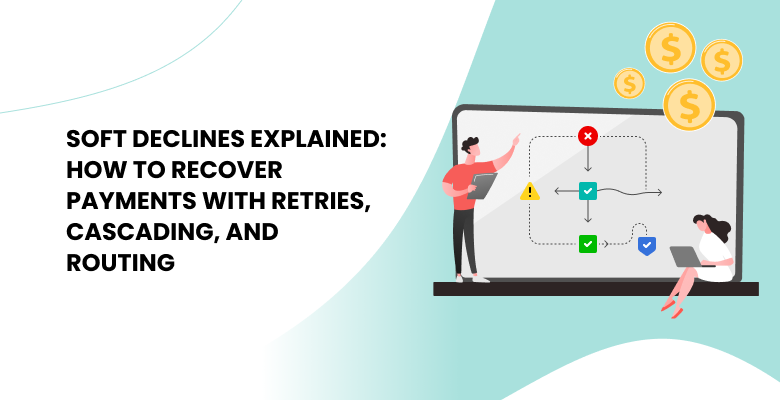
A declined transaction looks like lost revenue, but often it isn’t. Maybe the issuer required 3D Secure (3DS) authentication first. Its systems may have been briefly unavailable, or a processor had a short outage. None of that is a final no. With the right orchestration setup, many of these payments can still go through: after authentication, on a later attempt, or on another route.
What determines the result is the way you react. Teams without clear rules tend to keep trying everything and end up paying extra fees on declines that were never going to be approved, while other teams give up too early and lose payments that could have been kept because they treat every decline the same.
This guide explains what a soft decline is and how it’s different from a hard decline. You’ll learn how to turn decline codes into actionable reasons, and how to use retries, cascading, and routing to recover payments. It’s designed for enterprise merchant payment teams working in operations, product, and finance.
What is a soft decline?
A soft decline is a temporary refusal where the transaction may succeed later or under different conditions. The card isn’t rejected for good. The payment could go through if something changes, for example, the shopper authenticates, you try again later, or, when the problem sits with the route rather than the issuer, the payment goes through another provider.
Some PSPs and acquirers only label declines as soft or hard. Others pass through the issuer’s exact code, sometimes with a merchant advice code. Either way, it’s better to get the raw code where you can and check it against your own data on which retries worked, since a label is the provider’s own call, not the issuer’s answer.
Common causes are strong customer authentication (SCA) under PSD2, a short-term lack of funds or a card limit, a quick risk call by the issuer, and network problems.
Soft decline vs hard decline: what’s actually actionable
A hard decline is the issuer’s final answer. For example, the card number may be invalid, the account may be closed, or the card may be permanently restricted. Retrying with the same card details won’t change it and can hurt your approval rate.
A soft decline means there’s still a chance to recover the payment. The challenge is choosing the right action for each situation, which is what this guide will help you with.
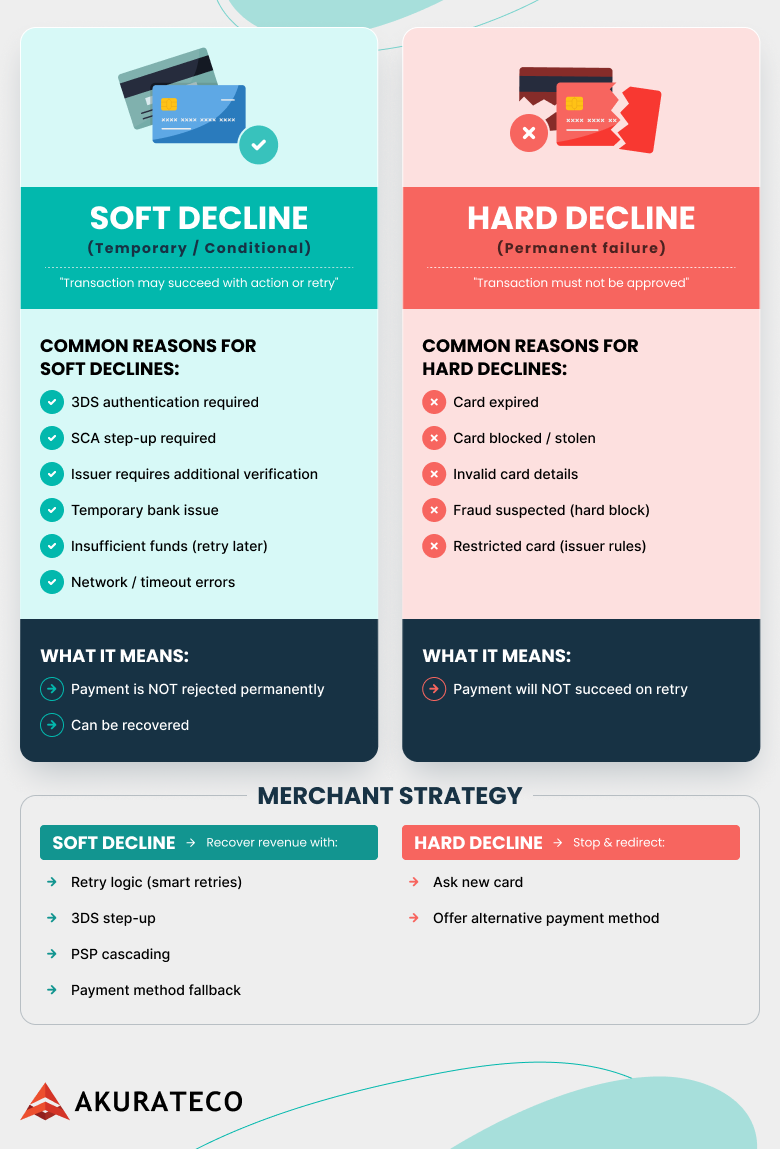
If you get this distinction right, you’ll avoid unnecessary retries and the extra fees that networks and processors can charge for repeated failed attempts.
The 5 most common soft decline buckets (and the right recovery move)
1. SCA or authentication required
Under PSD2 SCA rules, an issuer can refuse a payment if it hasn’t been authenticated and request 3D Secure (3DS) instead. This is one of the clearest examples of a soft decline, as the issuer makes it obvious what it wants.
Best action: send the shopper through 3DS and resubmit the authorization with the authentication data.
What not to do: resend the same unauthenticated request. It’s likely to fail again, and it chips away at the issuer’s trust in your traffic.
For more context on PSD2 SCA and authentication flows
2. Insufficient funds
The cardholder doesn’t have enough available balance at the moment, but that can change in a few days, like after payday. So, this type of decline can be recovered if you time your retry well.
Best action: at checkout, ask for another card, while for recurring payments, schedule the retry around the billing cycle or the times this card has cleared before.
What not to do: hammer the card with retries a few minutes apart; the balance hasn’t moved, and all that traffic just drags down your approval rate.
3. Generic issuer refusal: “Do not honor.”
“Do not honor” is one of the vaguest responses an issuer can give. Sometimes you can recover from it, but the code by itself isn’t a good reason to keep retrying.
Best action: look at how this issuer has behaved before and try a different route. If that fails too, ask the customer for another payment method.
What not to do: send the same request again with nothing changed, because an unchanged authentication, route and timing will most likely get an unchanged answer.
4. Temporary processing issues
You can usually recover a transaction prevented by an outage or network problem.
Best action: reverse any attempt that timed out, then wait a moment and retry. If the outage looks longer, send the payment through another acquirer.
What not to do: fire off several attempts at once, because by doing so, you add load to a system that’s already struggling and won’t improve your approval rate.
5. Issuer risk or velocity limits
Issuers also decline when a card hits a velocity threshold or when something about the payment looks risky. Changing the authentication or route may affect the answer.
Best action: add step-up authentication, or route through an acquirer with a stronger issuer relationship for that region or BIN group.
What not to do: throw extra checks at loyal repeat customers, or hand the problem back to the shopper at the first failure.
Recovery tools: retries vs cascading vs routing
Retry logic and smart retries
A retry only makes sense when something tells you the next attempt has a real chance, whether that’s the decline code, an advice code or your own data on how similar declines ended. A smart retry changes something. It might be the timing, the authentication or the route, but it’s never the same request sent twice.
Networks and processors can penalize excessive retry traffic, so every retry rule needs a point where it stops. That point comes from advice codes, how the issuer responds, and whether the recovered revenue still covers the fees.
Cascading payments in multi-PSP environments
When the issue is with the route, cascading sends a failed transaction to the next provider or acquirer instead of marking it as declined.
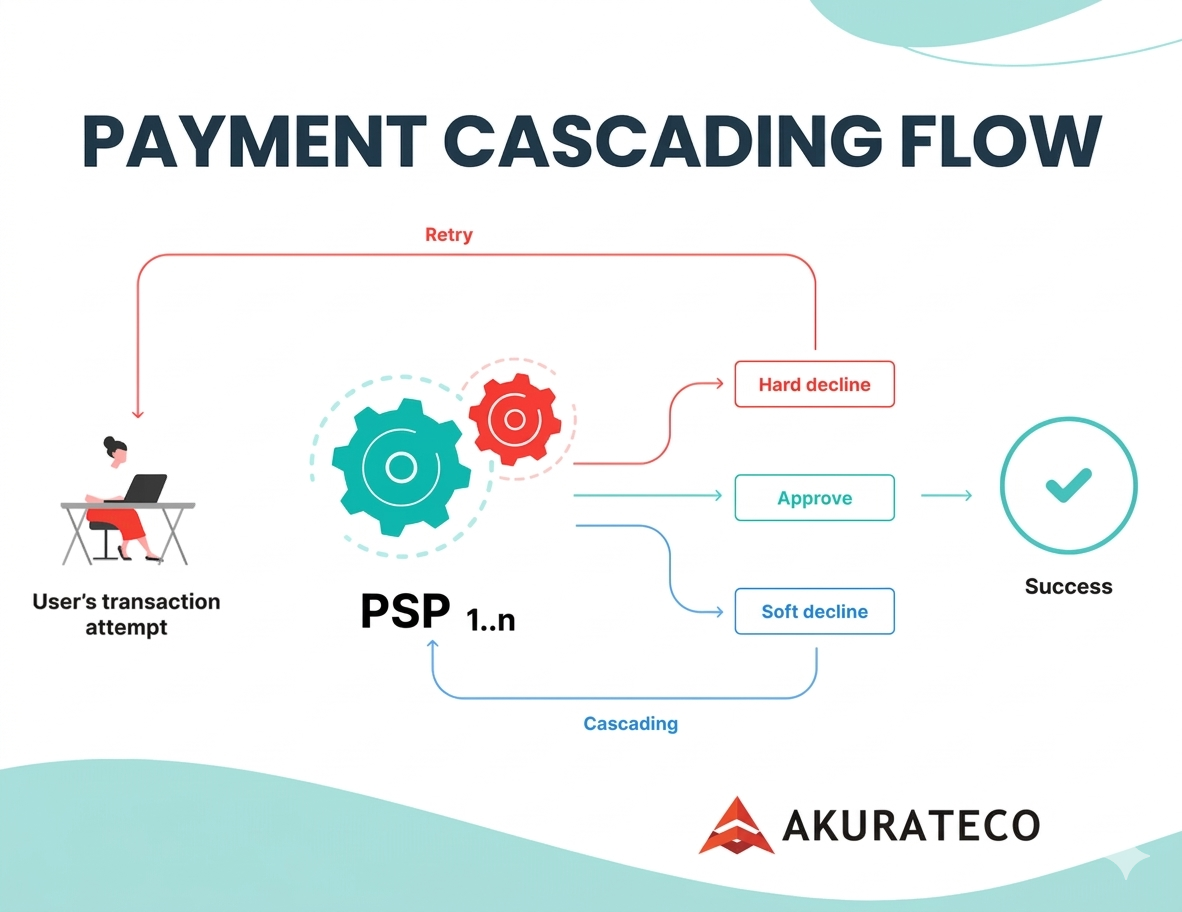
Cascading a hard decline won’t work, though, because the issuer will give the same answer on every route. You pay for each attempt, and the issuer trusts your traffic a little less.
Learn more about cascading payments and revenue growth
Payment routing and routing optimization
Routing decides which acquirer or provider gets the authorization in the first place. Good routing considers where the card was issued, how each provider has performed with that issuer, and whether the payment method fits, then picks the route most likely to be approved.
An orchestration platform can update these rules as new performance data comes in. The shopper doesn’t notice any of these changes.
Explore Akurateco’s routing guide for more details
Decline reason management across providers
Decline reason management means taking the decline responses from every provider you use, sorting them into one set of reasons, and deciding in advance what happens for each reason. It’s the piece that tells your retry, cascading and routing rules when to act and when to leave a payment alone.
Map provider codes into one reason list
If your rules are written per provider, every new route means rewriting them since every PSP and acquirer reports declines its own way.
Keep one internal list of reasons and map every provider’s codes onto it. 05 goes to “generic refusal”, 51 to “insufficient funds”, 41 and 43 to “lost or stolen card.” In Europe, Visa’s 1A and Mastercard’s 65 mean “authentication required”. Outside that context, 65 means the card has hit an activity limit. Map it by scheme and region, not by code alone. Your retry and routing rules then point to reasons.
The card networks already do part of this sorting. Visa groups its decline codes into four categories, from “issuer will never approve” to generic responses, and limits reattempts on them. A Mastercard merchant advice code of 03 means “do not try again.” Feed both into your mapping. Also keep a bucket for codes nobody has mapped yet and look at it every so often, or new codes will quietly end up under the wrong rule.
Separate internal reasons from shopper messages
Raw response data is for your payment team, who use it to work out what the issuer meant. A shopper who sees “Response 05” learns nothing and trusts the checkout a bit less.
So each reason gets two outputs: a rule for your payment stack and a short message the shopper can act on. The exception is a lost or stolen card or suspected fraud. In that case, show a plain “payment declined” and nothing more. A specific reason would tell someone testing stolen cards which ones are already blocked.
| Reason | What your system does | What the shopper sees |
|---|---|---|
| Authentication required | Runs 3DS, then resubmits with the authentication data | “Your bank needs you to confirm this payment.” |
| Insufficient funds | At checkout, asks for another card; for recurring payments, retries later, timed to the billing cycle or past approvals | “The payment didn’t go through. Please try another card.” |
| Generic refusal (“do not honor”) | Changes route or timing; if that fails, asks for another method | “Please try another card or payment method.” |
| Temporary processing issue | Retries after a short pause or cascades to another acquirer | Usually nothing, since the retry goes through. If not: “Something went wrong on our side. Please try again in a minute.” |
| Velocity or activity limit | Steps up with 3DS before retrying | “Your bank needs you to confirm this payment.” |
| Hard decline: invalid or expired card, closed account | Stops. No retries with the same card details. | “Please check your card details or use another card.” |
| Lost or stolen card, suspected fraud | Stops and flags the attempt for fraud review | “Payment declined.” No reason given |
The next two sections use the same list to drive the policy and the metrics.
How to build a soft decline recovery policy
A written recovery policy helps payment operations, engineering, and finance teams all follow the same rules. Without a policy, each decline is handled differently. With one, everyone knows when to retry, when to cascade, and when to contact the customer.
What the policy should cover:
- Which declines are actionable and which aren’t, based on issuer signals and your own data
- A retry schedule for each decline bucket
- Cascading rules across your PSPs
- When to ask the customer to act, and what to tell them
- Central logging, so you can see what was recovered and how approvals trend
For subscription merchants, having a policy like this means fewer customers are lost to failed renewals, because payments are recovered before the renewal period ends.
For additional context on failed transactions and prevention strategies
Measurement: prove you’re recovering revenue (not just creating traffic)
The success of recovery is measured by revenue. Without good tracking, a recovery program might just add more authorization attempts without actually increasing net revenue.
Metrics worth tracking:
- Recovery rate per decline reason
- Recovery rate by attempt number (first retry, second retry and so on)
- Approval lift per provider or route
- Net revenue after fees, including excessive retry fees
- Changes in conversion and approval rate
It’s also helpful to monitor issuers by BIN group and check over a few weeks if a routing change actually improved approval rates.
The Akurateco approach to soft decline recovery
Akurateco handles declines by using workflows that you set up yourself, rather than relying on a fixed rule set; retries, routing and cascading all take place in a single location, enabling merchants to keep up with changes in issuer behavior without having to add any operational work.
From the admin panel, you can:
- See why a payment failed, in plain words
- Change retry rules yourself, using issuer signals and advice codes
- Set how cascading passes a payment from one acquirer to the next
- Compare how providers and routes perform
Conclusion: turn declines into recoverable revenue
Many declined payments can still be recovered. By separating soft declines from hard ones and giving each reason its own rule, you can win back a significant amount of revenue.
Retries, routing and cascading work best as one system, with clear points where each of them stops. Set up that way, they raise your approval rate without adding unnecessary steps for the customer. Make sure to measure success by recovered revenue after fees, not just by the number of recovered attempts.
Soft Decline FAQ
What is a soft decline?
A soft decline is a temporary refusal where the transaction may succeed later, after authentication, or through another routing strategy. The card isn’t blocked. Something has to change first, such as 3DS, a later attempt, or, if the problem is with the route, a different acquirer, and once it does, the payment often goes through.
Soft decline vs hard decline: can I retry?
A soft decline is a temporary problem, meaning, yes, you can usually retry it, though not always with the same request: authentication-required declines need 3DS first. A hard decline is a permanent rejection. To get paid, you need new card details or another payment method. Never retry a code for a closed, lost or stolen card.
How do I handle authentication required soft declines?
Send the shopper through a step-up 3D Secure (3DS) flow, then resubmit the authorization with the authentication data attached. Don’t just retry the original request. Without authentication, it will most likely be declined again, and repeated attempts make the issuer less willing to approve your payments.
How many retries is too many?
Card networks set their own limits. Some declines, such as Visa’s Category 1 codes, can’t be retried at all. Inside those limits, go by your processor’s guidance and the issuer’s signals, and stop once approval odds drop or fees outweigh what you recover.
When should I use cascading payments vs retry logic?
Use cascading when the primary provider fails or underperforms. If the issuer declined for a reason that may clear with time (temporary technical errors or delayed funding issues), retry later instead.
What is decline reason management?
It’s the practice of taking decline responses from every PSP and acquirer, mapping them to one internal list of reasons, and setting a next step for each one, such as a retry, 3DS, a new route, a request for another card, or stopping altogether.