

- What Is Payment Settlement?
- Clearing vs. Settlement vs. Funding
- How Payment Settlement Works Step-By-Step
- Settlement Timelines: What Impacts the Settlement Cycle
- Gross vs. Net: Why the Deposited Amount Isn’t the Sale Amount
- Settlement Report: What It Contains and How to Read It
- Payment Reconciliation vs. Settlement: Why Settlement Needs Reconciliation
- How Orchestration Helps: Settlement Tracking and Automated Reconciliation
- Common Settlement Problems and Troubleshooting Checklist
- Conclusion
A payment can be approved and still not show up in your bank account for days. That’s not a bug. It’s the payment settlement process. Finance teams may spend hours chasing “missing” revenue, but in reality, it’s just moving through a process with rules, cutoffs, and reports.
Settlement is a chain of steps that run on different schedules, and each provider has its own rules. If you operate in a multi-PSP environment, mismatches are inevitable. The important thing is to catch them early and know where they come from. A payment orchestration platform like Akurateco offers a unified hub that simplifies the back office by centralizing data, reports, and the full payment trail across providers. If you’re not sure whether you need payment orchestration vs payment gateway, it’s worth noting that many modern solutions combine both in a single stack.
Here is a detailed guide on how settlement actually works in practice. You’ll learn typical timelines, what settlement reports contain, and how to consolidate the data to avoid guessing again.
What Is Payment Settlement?
Settlement is the process by which funds move between the issuer (customer side) and the acquirer (merchant side). It happens after authorization and capture, usually as part of a batch, and it finalizes the transaction amount minus fees in the payment system. It is not the same as payout or funding. The deposit to your bank account typically happens later, based on your provider’s payout schedule.
The payment settlement process involves three key participants:
- Issuing bank (issuer). It’s the customer’s bank that issued the card. It approves or declines the payment and releases funds during settlement.
- Acquiring bank (acquirer). The merchant’s bank (or the bank behind the PSP). It accepts the card transaction for the merchant settlement and receives funds from the issuer.
- Card network (scheme). This can be Visa/Mastercard/AmEx, etc. It routes transaction messages and settlement files between issuer and acquirer and applies network rules and fees.
Clearing vs. Settlement vs. Funding
Payment settlement is often misunderstood and confused with other related terms we already mentioned previously: clearing and funding. They describe different steps that can happen on different days.
Let’s go through these terms in the sequence you’ll see in real payment flows.
| Term | What it means | What you’ll see in practice |
| Clearing | Exchange and validation/matching of transaction records between the parties | Files/messages are reconciled (amounts, timestamps, IDs). Errors show up as mismatches or rejects. |
| Settlement | Financial movement between participants (issuer and acquirer), typically as net positions for a batch | Funds move within the payment system, and fees are applied. This is not your bank deposit yet. |
| Funding/payout | The merchant actually receives the money in their bank account | The processor/acquirer pays out the net amount on a schedule (daily/weekly, business days after the transaction date), so it can lag behind the transaction date. |
In short, clearing is the matching and confirmation step, settlement is the transfer of funds between institutions, and funding (payout) is the actual deposit into your account.
How Payment Settlement Works Step-By-Step
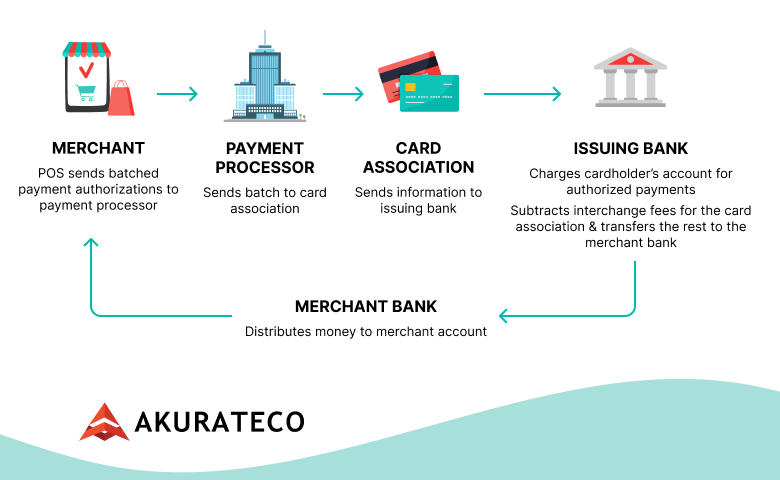
A card payment goes through a fixed chain of steps before money reaches your bank. Below is the exact flow that explains the whole process and specifies why the transaction date, settlement date, and payout date often differ.
Authorization
The issuer approves or declines the payment. An approval is a green light (often a hold), not money in your account.
Capture
It’s when you finalize the charge by converting the authorization hold into a confirmed payment. After capture, the transaction becomes eligible for clearing and settlement. If capture is delayed, everything after it shifts too.
Batching
Captured transactions are grouped into a batch, usually by daily cutoff time. Miss the cutoff, and the transaction typically moves to the next cycle.
Clearing
Transaction data is sent through the card network and matched between the acquirer and issuer (amounts, IDs, and fees logic). This is where data mismatches show up.
Settlement
Based on cleared records, the issuer transfers funds to the acquirer (netted across participants/batches, with scheme/interchange fees applied).
Funding (Payout)
Your processor/acquirer pays out the net amount to your bank on its payout schedule (T+N, daily/weekly). That deposit can lag behind the transaction date.
Settlement Timelines: What Impacts the Settlement Cycle
Most payments follow the same sequence:
- Day T: The payment is authorized and then captured.
- Day T (by the end of the day): Captured transactions are usually added to a daily batch.
- T+1: The batch typically goes through clearing and settlement (from the issuer to the acquirer).
- T+1 or T+2 business days: Your provider pays out the net amount to your bank.
That said, this flow isn’t always linear. Common reasons it slows down include:
- Cutoff times and weekends/holidays: If capture occurs after the provider’s cutoff, the transaction is processed on the next processing day. Weekends and bank holidays typically delay clearing, settlement, and bank deposits.
- Payment method: Card payments typically follow daily batch cycles. ACH settlement/SEPA transfers follow bank processing windows and their own batching schedule, so timing rules for bank transfer settlement differ.
- Risk holds and rolling reserve: A provider may delay payouts for review or risk checks. A rolling reserve withholds part of the funds for a set period, reducing or delaying what you receive.
- Cross-border routes and currency conversion: Cross-border processing adds extra parties and calendars. FX can add extra cutoffs and separate settlement/payout timing, especially when settlement and payout currencies differ.
- Provider/acquirer agreements (T+0/T+1/T+2): Your payout speed is defined by contract and provider policy, so two PSPs can settle the same day but pay out on different schedules.
Because settlement steps happen separately and timing exceptions are common, transaction, settlement, and payout dates often differ. Teams clearly can’t affect clearing or settlement directly. But it’s possible to improve the consistency with which payments move through the cycle. You get more reliable payouts when you capture on time, avoid cutoff misses, route intelligently, keep IDs clean, and limit avoidable holds. A payment orchestration platform works by centralizing this logic and the data you need to monitor it across providers and act on the reporting.
Gross vs. Net: Why the Deposited Amount Isn’t the Sale Amount
When a customer pays you $1,000 for a product, it doesn’t mean you get this exact sum after settlement. The sale amount is gross, but your payout is net. Parts of it go to banks, card networks, and your provider. In addition, other payment events (refunds, chargebacks, reserves) can affect your payout later, potentially making daily totals look “off.” Basically, your payout is your sale amount minus fees and any adjustments.
For effective cash planning, assume your payout will be lower than sales because of these common deduction lines:
- Interchange fees: Go mainly to the issuing bank (the customer’s bank).
- Scheme fees: Charged by the card network (like Visa/Mastercard) for running the transaction through their rails.
- Merchant discount rate (MDR): The processing fee you often see in your contract with a PSP/acquirer (often including interchange, scheme, and acquirer/PSP margin).
Also, merchants need to consider the possibility of refunds, chargebacks, and disputes. Refunds are usually netted from your next payout (sometimes with fees not returned), and chargebacks or disputes may trigger a temporary debit while the case is reviewed, with a dispute fee if you lose.
Sometimes providers don’t release the full amount immediately. They keep a reserve as a safety buffer. Another related payment event is a rolling reserve, which means providers hold back a percentage of each day’s sales and release it later. These actions help providers create a “cushion” when partnering with higher-risk industries, new merchants with little history, fast-growing volumes, or high-ticket/long-delivery businesses where disputes tend to arrive weeks later.
Going back to the example with a $1,000 payment, in a typical case, after interchange fees, scheme fees, and your MDR, your payout might be around $970–$985 (approximately $15–$30 in total fees). If there’s also a $50 adjustment from a past refund/dispute and a $60 rolling reserve held for later, the same $1,000 sale could result in a payout closer to $860–$875 for that day.
Settlement Report: What It Contains and How to Read It
A settlement report is the summary document your PSP (acquirer) provides to you that explains all payout details. Many providers offer transaction-level reports where each row is a separate entry (payments, fees, refunds, chargebacks, and payout lines), so you can reconcile a deposit by grouping rows by batch/payout reference.
A representative example is Adyen’s settlement details report, which follows the same pattern merchants use for reconciliation. It’s straightforward and easy to read.
- Match the payout/batch reference to your bank deposit (or use the same date and amount).
- Filter the report to that one payout so you only see the lines that built it.
- Read each row as a simple breakdown: gross amount minus fees and adjustments equals net amount.
Even when you follow this process, settlement reports can still look confusing at first glance, mainly because providers record different events as separate rows. If the numbers don’t seem to line up, it’s usually because of one of these:
- Duplicate IDs: One order can show up multiple times (auth, capture, retry, split shipments). Fix: Match by your order ID, amount, and timestamp, and check the “type” column.
- Partial refunds: Refunds may be issued in parts and appear later in a separate payout. Fix: Search the report for all refund lines tied to the original transaction and sum them.
- Fees shown on separate lines: Fees may not be inside the payment row. They’re listed as separate fee entries. Fix: Include fee rows when summing net amounts for the payout/batch.
- Currency rounding: FX conversion and rounding rules can cause small cent-level differences. Fix: Reconcile in the settlement currency first, then account for FX rate and rounding at payout.
These small reporting details are exactly why reconciliation matters: they can make a payout look “wrong” until you match every line item back to the original transactions. An orchestration layer makes it easier by consolidating payout data from all providers into a single place and ensuring consistency.
Payment Reconciliation vs. Settlement: Why Settlement Needs Reconciliation
Settlement happens in the background and doesn’t automatically give merchants a clear, coherent summary of where the money went. Reconciliation is what makes it usable.
Payment settlement reconciliation is the process of matching your internal payment records with what your provider reports and what your bank statement shows. It’s a regular finance activity that helps merchants spot missing transactions, wrong amounts, duplicate charges, or potential fraud.
If you’d like to see how merchants do this in practice, we’ve got a separate reconciliation guide that walks through the process step by step. You’ll learn how to match payouts to transactions and handle refunds, disputes, and holds without guesswork. It’s the one to share with your finance or operations team before month-end.
How Orchestration Helps: Settlement Tracking and Automated Reconciliation
As we mentioned earlier, the payment settlement process has multiple stages, and it’s not always easy for a merchant to track what’s happening at each step. When you’re processing a high volume of transactions, that complexity multiplies with small fees, refunds, disputes, and timing differences, which can quickly make payouts hard to explain.
Reconciliation turns settlement data into a clear view of cash flow by matching each payout to the payments and adjustments that support it. Many merchants still try to do this manually in spreadsheets. It’s tedious, slows the process down, and is prone to errors. With an orchestration layer and centralized reporting, the same work becomes faster, more consistent, and much easier to control:
- All payouts in one place. No more jumping between PSP dashboards and exporting five different files.
- One clean format. Different columns, IDs, dates, fee lines, and currencies get standardized.
- Payouts matched automatically. Each deposit is tied back to the exact payments, fees, refunds, disputes, and reserves behind it.
- See where the money is. The entire payment journey is visible, so delays don’t catch you by surprise at the end of the month.
- Catch issues early: Missing transactions, duplicates, partial refunds, fee changes, and chargeback adjustments are flagged before finance starts chasing.
- FX stops being a mess. Settlement and payout currencies stay aligned, with FX details in the same view.
- Know which provider costs you more. Compare payout speed, fee impact, and mismatch rate across providers.
- Less spreadsheet pain. Faster close, fewer manual checks.
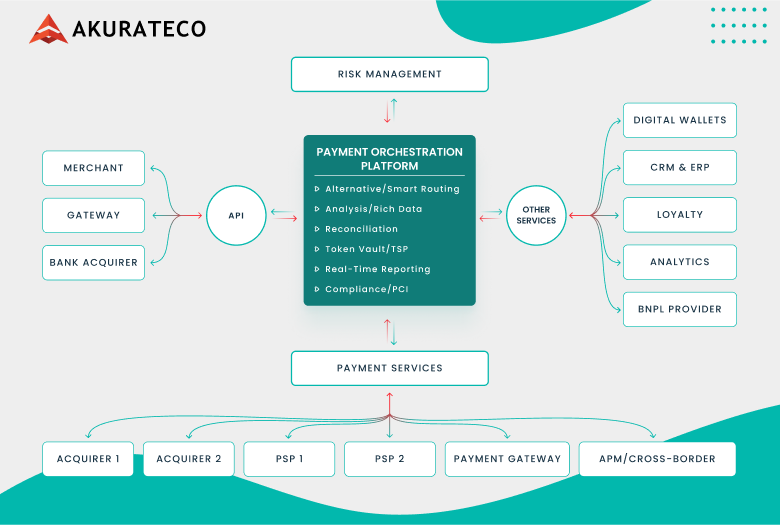
Akurateco’s payments orchestration platform includes built-in settlement tracking and automated reconciliation across 700+ connectors, including PSPs, acquirers, and payment methods, with centralized reporting and analytics in a single dashboard. You also get Payment Team as a Service, where a dedicated team helps with onboarding, logic setup, and ongoing operations.
Common Settlement Problems and Troubleshooting Checklist
Merchants often see payouts that show up late, come in lower than expected, or even seem to be missing. Most of the time, it’s one of a few usual causes. We compiled this checklist to help you quickly figure out which one and find the solution.
When the payout arrives later than expected
Most likely, you missed the cut-off.
If the payment is captured after your provider’s cut-off time, it usually rolls into the next processing day. Weekends, holidays, and slower payment methods can push it out even further.
What to do: Check when the payment was captured, compare it to the cut-off time, and confirm your provider’s payout schedule and business-day rules.
When the payout is lower than your sales
In this situation, fees were deducted from your payment, a reserve was held back, or refunds, disputes, or currency conversion reduced the amount you received.
What to do: Open the settlement report and follow the gross-to-net breakdown. Look for fee lines, reserve holds, refund entries, dispute adjustments, and any FX lines.
When some payments aren’t included in the payout
The first reason a payment may be absent is that it was approved but never captured. Another cause is that it missed the batch cut-off and moved to the next processing cycle.
What to do: Confirm the payment status in your system and in your provider’s dashboard. If it was captured, find which payout it was assigned to.
When payouts don’t match your order records
This often comes down to retries, partial captures, split shipments, or different IDs used across systems.
What to do: Match using more than one detail, such as order ID, amount, and timestamp. Use the provider’s transaction reference to trace the payment through the report.
When chargebacks show up later
As a rule, disputes are posted days or weeks after the original sale. They often appear as separate adjustment lines.
What to do: Search the report for dispute and chargeback entries linked to the original payment and reconcile them to the date they were posted, not the sale date.
Conclusion
The payment settlement process isn’t instant: it moves through several stages, each adding more data to the payment trail. Because of that complexity, merchants, both SMBs and enterprises, often end up chasing “missing” money when payouts arrive late, come in lower than expected, or don’t match orders cleanly. With solid reporting and automated reconciliation, payouts become more predictable and easier to explain.
FAQ
What is the payment settlement process?
The payment settlement process is the set of steps that moves a card payment from “approved” to “settled” between the customer’s bank and the merchant’s side. It happens after capture, usually in batches, and it is separate from the payout that reaches your bank account.
What’s the difference between clearing and settlement?
Clearing is the stage where payment records are exchanged and matched between parties, so amounts and IDs are validated and errors are identified. Settlement is the stage where money is transferred between the issuing and acquiring sides, usually as net amounts for a batch.
How long does payment settlement usually take?
It typically takes T+1 or T+2 business days from capture to settlement and payout, although provider schedules, cut-off times, weekends, and holidays can extend the timeline. Cut-off times, weekends, bank holidays, risk holds, cross-border processing, and your payout agreement can make it faster or slower.
Why doesn’t my payout match the transaction amount?
Because payouts are net of fees and adjustments. Banks, card networks, and your provider take fees, and later events like refunds, disputes, chargebacks, reserves, and currency conversion can reduce or delay what you receive.
What is a settlement report, and what should it include?
A settlement report is the document your PSP or acquirer provides that explains how a payout was built. It should include payout or batch reference, transaction references, payment settlement date, currency, fee lines, adjustments such as refunds or disputes, and the net amount. This way, you can trace each deposit back to the underlying payments.